Notifications sits at the bottom of the sidebar, above Settings. The badge on it is the number of notifications you have not read yet (99+ when there are more). It is refreshed when you sign in, every ten minutes after that, and each time you read one.
What arrives here
- An address invitation from a business that wants you as its subcontractor, and the answer when one you sent is accepted, rejected or cancelled.
- An address assigned to you, and a subcontractor invitation the sender withdrew.
- A complaint raised on one of your addresses, a comment on it, and the complaint being resolved, reopened, archived or restored by the other business.
- You were charged for the rework on a complaint on an address: the business you work for put a charge for a complaint on your settlement, or changed its amount (see How a complaint is assessed, timed and settled).
- A dispatch you are invited to, and a dispatch that was accepted.
- An export that is ready to download.
These go to the bell only. There is no e-mail or text message for them; the mobile app gets its own push notifications. There are two exceptions. A new complaint: the colleagues chosen under Settings → Notifications are e-mailed about it as well, see Get an e-mail when a complaint is created. And a finished export: the person who started it is also e-mailed a link that downloads the file, see Export invoices and reports. Separately from the bell, a stop a driver marks unable in the app is e-mailed to the Email on error address under Settings → Business, see Set up your business.
The bell is not the only counter in the sidebar. Locations and its Complaints entry carry a badge of their own with the number of complaints still open, in the same orange pill; it is refreshed on the same ten-minute clock and each time you leave the complaints page.
Read them
-
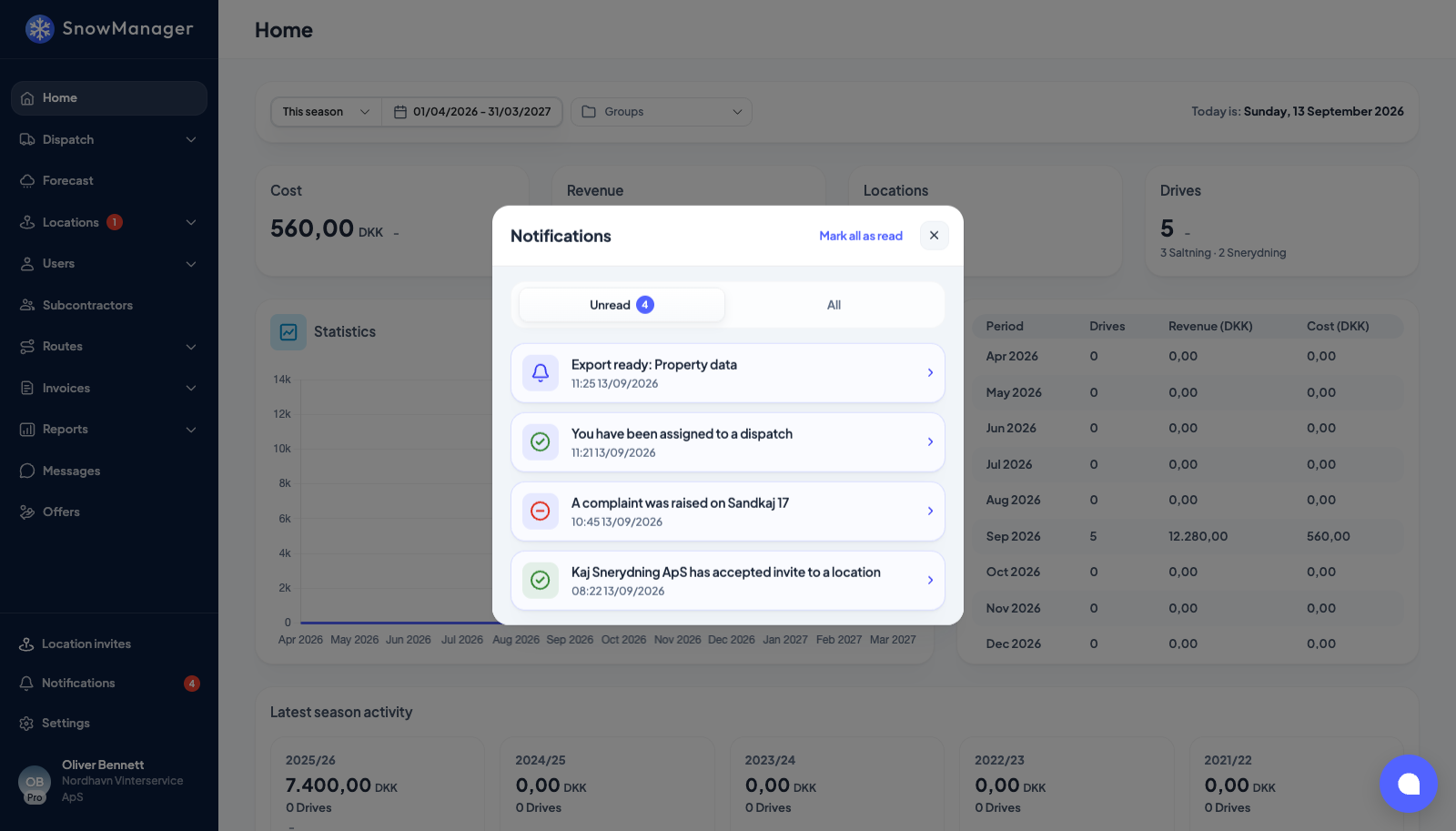
Press Notifications in the sidebar.
-
The list opens on Unread, with the count on the tab. All shows everything, read or not. Each row has an icon for its kind, a title and the time.
-
Click a row. It is marked as read, and the thing it is about opens: an address invitation opens the invitation popup, an assigned or answered address opens the address, a new complaint, a comment or a charge opens the address with that complaint open on its complaints tab, a dispatch notification takes you to the Dispatch list, and a finished export opens its row under Reports → Export → History. The others (a resolved or archived complaint, a withdrawn invitation) are only marked read.
The popup shows twenty rows at a time. Load more at the bottom fetches the next twenty.
Mark all as read
Mark all as read at the top of the popup appears as long as something is unread. It clears the badge and empties the Unread tab; the rows stay under All.
Empty
No unread notifications means just that: everything has been read. No notifications yet under All means nothing has been sent to your account so far.