A new season usually means new prices. Instead of opening every address, Price regulation changes the work-type prices of many addresses in one go. It works on all your addresses, not on the rows you have searched in the list.
-
On Locations, press Bulk actions and choose Price regulation. The popup warns you up front: Note that you cannot go back without making a negative price adjustment.
-
Pick a Regulation type:
- Customer price raises what you bill the customer, per work type.
- Subcontractor cost raises what you pay the subcontractor for the address.
- Season for subcontractors lists only addresses paid per season and raises their price. A Subcontractor filter narrows these two to one contractor's addresses.
- Sqm (or Sq ft in an imperial business) uses no percentage. You type a price per square metre for each work type, and the address's price becomes that rate times its total area. Locations with no total area set or with seasonal pricing type will not appear in the list.
-
Last regulation before shows only addresses not regulated since a date. It is a filter, not an effective date: what you confirm applies immediately. Only overdue regulations keeps the addresses whose yearly regulation date has come round without a regulation since (measured in your business's own calendar); each of those rows says Overdue since and the date.
-
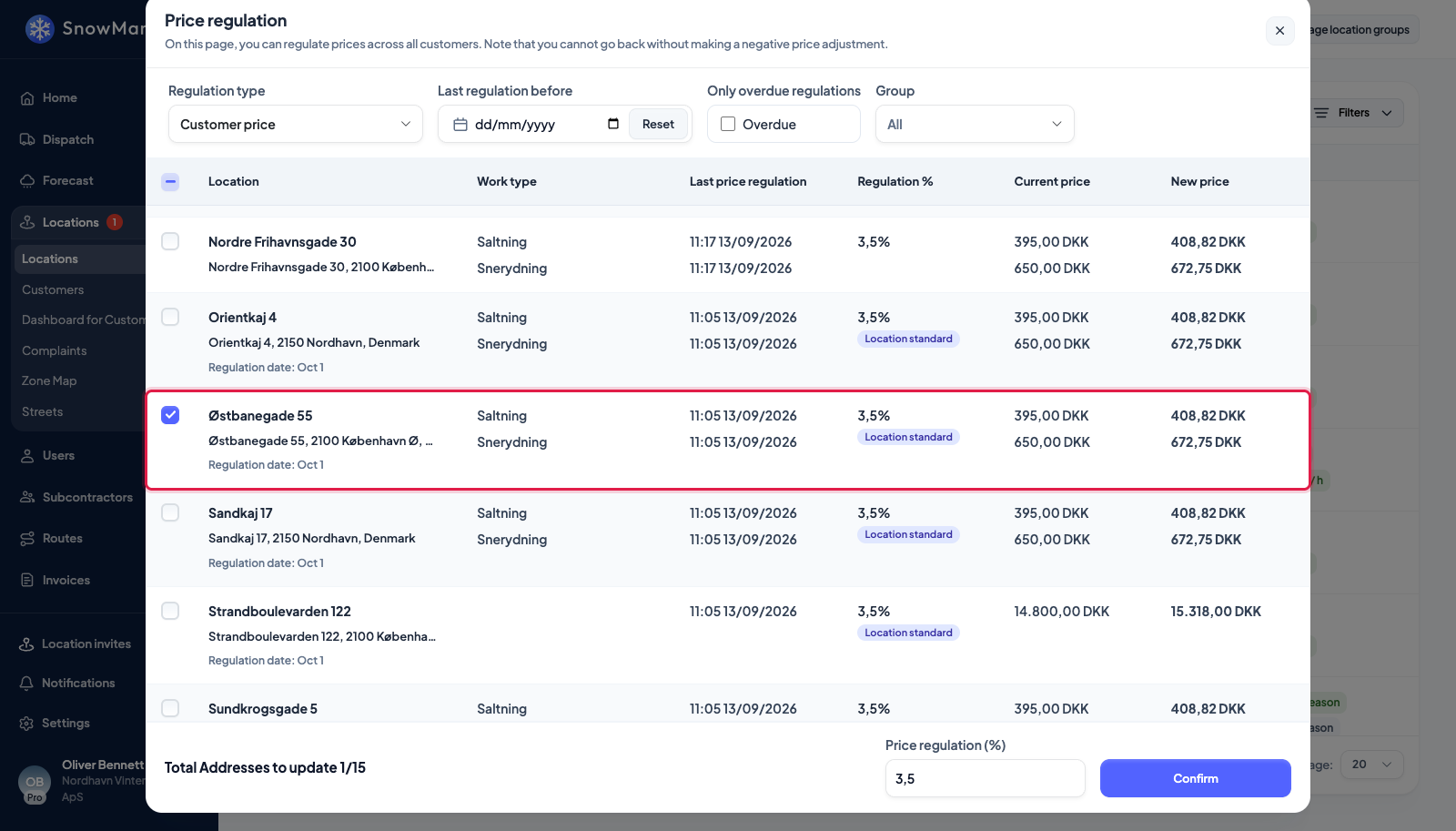
Type the percentage in Price regulation (%). A negative number lowers prices. Each row shows Current price (or Current cost) and New price (or New cost) per work type, so the table is the preview. The Regulation % column says which percentage each row will get, see the next section.
-
Tick the addresses to change; Total Addresses to update 3/12 counts them. If any new figure would fall below zero you see One or more locations would receive a negative price. and cannot continue.
-
Press Confirm. Prices are rounded to two decimals, and the popup stays open for a second run, for another type.
Set new amounts instead of a percentage
Beside the date, Change by switches between Percent and Amount. Choose Amount to set prices one by one rather than by one percentage: the New price column becomes a box on every line, filled with the current value. Type the new amount on the lines you want to change. Changing a line ticks its address. Regulation % shows the percentage each line comes to. Press Confirm: only the lines you changed move, and the rest of each address stays as it was.
The change is logged like a percentage run. The address's Changelog gets the old and new price. The History tab marks the run Amount change and lists the percentage of every line. A price that was zero has no percentage. A snow depth scale moves by the same share as its price. The address's own Standard price regulation (%) plays no part here. Amount works for every regulation type except Sqm, which already sets a price per area.
An address with its own percentage
Some contracts fix their own regulation: three per cent every 1 October, say, whatever the rest of the book does. Open the address, fold out More fields under its details and fill in Standard price regulation (%) and Price regulation every year on, a day and a month (see Add an address). Both are optional and independent.
In the popup they change two things:
- Regulation % shows, per row, the percentage that will apply: the address's own where it has one, badged Location standard, otherwise the one typed into Price regulation (%). Once every ticked address carries its own percentage, the popup's field may be left empty; while any ticked address has neither, Confirm refuses.
- Regulation date shows under the address as the day and month ("1 Oct"). The address is overdue when that date has last come round, this year or last, and no price regulation has landed on or after it; the row then says Overdue since and that date, and Only overdue regulations keeps exactly those rows. Confirming a regulation is what clears it: the address is regulated, so it is not due again until the date comes round next year. Nothing has to be moved by hand, and an address whose date is 1 October is overdue every October until you regulate it.
The date is a reminder, nothing more: nothing regulates by itself when it passes. A 29 February date counts as 28 February in years without one.
What it changes, and what it does not
Only the work-type prices of the ticked addresses change. On an address priced by snow depth, every band moves by the percentage, so the scale keeps its shape (see Pricing by snow depth). Extra prices, prices on a service rule and the address's area are untouched. An address with no price stays at no price, because a percentage of nothing is nothing; give it a price first (see Set prices and costs on an address).
The change stays in your business. Regulating Subcontractor cost does not rewrite your subcontractor's own prices; tell them, or let them regulate on their side.
Each changed row is written to the address's changelog, and the date shows in Last price regulation next time, which is what Last regulation before reads.
A regulation does not offer to bill earlier work. That offer appears only when you set a price on an address that had none; see Bill completed work that had no price.